In a previous post I outlined how we can take a set of addresses scraped from Tennis NZs website and geocode them to get latitude and longitude coordinates. This gave us the locations of all tennis clubs in Auckland, New Zealand. Now we have the data in a good format for mapping, we can carry out various forms of additional analysis.
A couple of super powerful tools to have at our disposal are the isodistance and isochrone! Simply, an isodistance is a radius around a point on a map that indicates a distance away from that point. An isochrone is the same, but using travel time rather than distance. This will be impacted by various factors, such as proximity to motoways, rurality, geographic obstacles and so on.
There are various services that you can use to get this information, but I will show you how you can carry out this work yourself. Using R, we can save time by progamatically going through all of our data automatically, and we can save money (no API calls to services needed). We’re going to draw upon data on the New Zealand road network to carry out our work. Here’s a map I made earlier that visualises this network, which is based on the data provided by Beere, P., (2016).
New Zealand Road Network
As a first step, we’re going to load up the tennis club data.
Code
library(here)library(dplyr)library(reactable)df <-read.csv(here("inputs","tennis","tennis_coords.csv"))#We know the geocoding failed on some addresses, so we'll exclude thosedf_clean <- df |>filter(!is.na(latitude) |!is.na(longitude)) df_clean |>head() |>reactable()
Processing our Data
First things first, we need to set up our spatial data. We’re going to need 3 different pieces of data:
1: The shape file for Auckland Central.
This is will be our map layer, showing where Auckland is.
Code
library(sf)library(stringr)nz_sf <-read_sf(here("inputs", "shapefiles", "NZ_res01.shp")) # Get the coordinates for Auckland in WGS84auckland_coords <-matrix(c(174.5, -37.0, # min x, min y (SW corner)174.95, -37.0, # max x, min y (SE corner)174.95, -36.7, # max x, max y (NE corner)174.5, -36.7, # min x, max y (NW corner)174.5, -37.0# closing point (SW corner) ), ncol =2,byrow =TRUE)# Create a POLYGON from the bounding box and set CRS to WGS84auckland_polygon <-st_polygon(list(auckland_coords)) |>st_sfc(crs =4326) # Load the shapefile and transform to NZTM2000 (EPSG: 2193)auckland_sf <- nz_sf |># Intersect the Auckland shapefile with the Auckland bounding boxst_intersection(auckland_polygon) |>st_transform(crs =2193)
2: We’ll need the road network data.
We’ll need to filter this data to only include roads within Auckland, and we’ll also need to make sure the Coordinate Reference System (CRS) is the same as our Auckland data. The CRS tells R which map projection to use, and if the layers in our data use different projections, the map won’t look correct. You can use the function st_crs(data) to get the CRS of an object, and the st_transform to set it as the same.
As you can see, the road network data contains a range of variables identifying what type of road it is, and where it is located. We’re going to filter out any roads that are not for cars.
Code
#Load our road datanz_roads <-st_read(here("inputs","shapefiles","NZ_roads.shp"),quiet = T ) #set NZ roads CRS to be the same as the auckland sf.#nz_roads<-st_transform(nz_roads, st_crs(auckland_polygon)) #roads_inside_auckland <- st_intersection(nz_roads, auckland_polygon)#get the roads tidyauckland_roads <- nz_roads |>filter(notforcar ==0) |>filter(region =="auckland") |>filter(!str_detect(label,"auckland waiheke island ferry")) |>st_transform(crs =2193) head(auckland_roads) |>reactable()
3: We need to transform our tennis club location data
We’ll need to make sure it’s in the same format and CRS.
Code
#clean point df and put to sfpoint_sf <- df_clean |>st_as_sf(coords =c("longitude", "latitude"),crs =4326 ) point_sf_auckland <- point_sf |>st_intersection(auckland_polygon) |>st_transform(crs =2193)
Calculating Isodistances
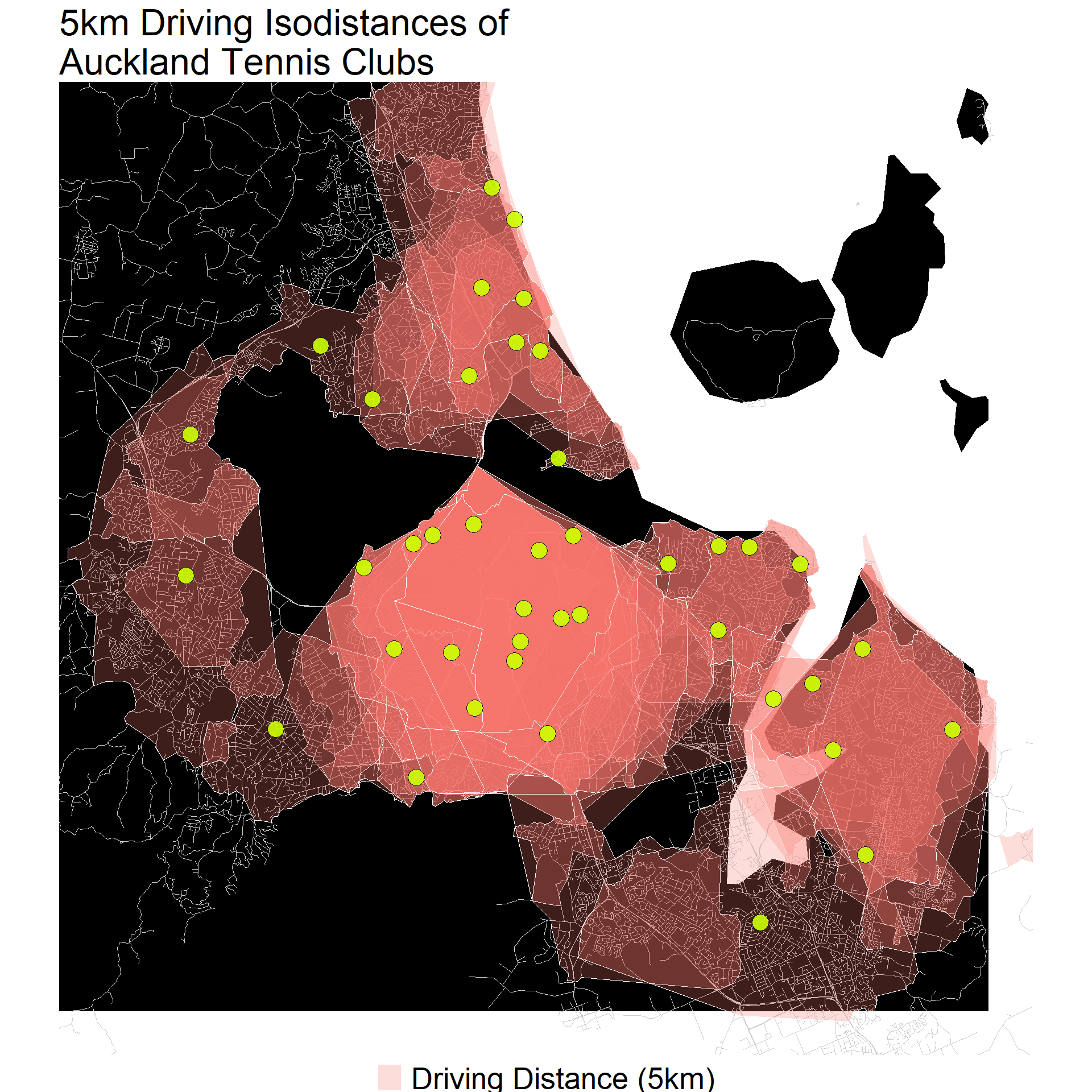
By getting the point data and the road map data into the same format, we’ve done much of the hard work. Our next step involves generating isodistance polygons from each of the tennis clubs based on the road network. We’ll make use of the calc_isochrones function from the spNetwork package to accomplish this. The results of this function are passed onto the concaveman package which provides polygons for our mapping use. The code below goes through each point in our tennis club data, and generates an isodistance around them of 5km.
Note: This function can take a bit of time to run, depending on the processing power available. You can set multiple distance values, which is really handy, but for now we will stick to 5000m (5km).
Code
library(spNetwork)library(concaveman)for(i in1:nrow(point_sf_auckland)){cat("\nGenerating isodistance for ",i,":", point_sf_auckland$storepoint_address[i]) iso_results <-calc_isochrones(lines = auckland_roads,start_points = point_sf_auckland[i,],dists =c(5000),weight ="Shape_Leng" )# identifying each isocdistance iso_results$iso_oid <-paste( iso_results$point_id, iso_results$distance,sep ="_" )# creating the polygons for each isodistance polygons <-lapply(unique(iso_results$iso_oid), function(oid){# subseting the required lines lines <-subset(iso_results, iso_results$iso_oid == oid)# extracting the coordinates of the lines coords <-st_coordinates(lines) poly_coords <-concaveman(points = coords, concavity =3) poly <-st_polygon(list(poly_coords[,1:2]))return(poly) })# creating a SpatialPolygonsDataFrame iso_sp <-st_sf(iso_oid =unique(iso_results$iso_oid),distance =unique(iso_results$distance),geometry = polygons,crs =st_crs(iso_results) ) %>%mutate(storepoint_address = point_sf_auckland$storepoint_address[i]) iso_sp %>%write_sf(here("inputs","tennis",paste0("tennis_polygon_",i,".shp")))}
The above code chunk will save each tennis club isodistance as an individual shape file. We can load them individually, or grab them all and put them in a dataset as shown below.
And here’s what our distances look like. Maps like these can be very valuable for identifying gaps in access. Are there any places that tennis clubs isodistances do not cover?
It’s important to bear in mind the quality of the data is always important when drawing conclusions. For example, we know some tennis clubs are missing from our data, so some gaps in access may not really be gaps. This method also relies on having road network data available for use. A lot of work can go into processing these data, while there are other open source options/libraries available as well, such openrouteservice.
The key advantages of this approach is that it avoids using API calls, instead using a local shape file of the NZ road network. This means that we could iterate through a whole range of distances, and process a whole load of data (even if it may take some time). Key things to watch out for, as always, is data quality. External services with an API may be more reliable.
Source Code
---title: 'Second Set: Drive Isodistances'date: '2024-09-02'categories: ['R', 'Geospatial','New Zealand']description: 'In this post, I look at how you can use road network data to get drive time radii around Tennis courts in Auckland, New Zealand.'author: 'Steven Turnbull'image: "./MappingNZ_2023_11_06.png"twitter-card: image: "./MappingNZ_2023_11_06.png"open-graph: image: "./MappingNZ_2023_11_06.png"execute: message: false warning: falseeditor_options: chunk_output_type: consoleformat: html: code-fold: show code-tools: true---# Understanding Catchment AreasIn a [previous post](https://sturbull.github.io./posts/tennis/FirstSet_Webscraping_and_GeoCoding.html) I outlined how we can take a set of addresses scraped from Tennis NZs [website](https://tennis.kiwi/play/play-tennis/) and geocode them to get latitude and longitude coordinates. This gave us the locations of all tennis clubs in Auckland, New Zealand. Now we have the data in a good format for mapping, we can carry out various forms of additional analysis.A couple of super powerful tools to have at our disposal are the isodistance and [isochrone](https://wiki.openstreetmap.org/wiki/Isochrone)! Simply, an isodistance is a radius around a point on a map that indicates a distance away from that point. An isochrone is the same, but using travel *time* rather than distance. This will be impacted by various factors, such as proximity to motoways, rurality, geographic obstacles and so on.There are various services that you can use to get this information, but I will show you how you can carry out this work yourself. Using R, we can save time by progamatically going through all of our data automatically, and we can save money (no API calls to services needed). We're going to draw upon data on the New Zealand road network to carry out our work. Here's a map I made earlier that visualises this network, which is based on the data provided by Beere, P., (2016).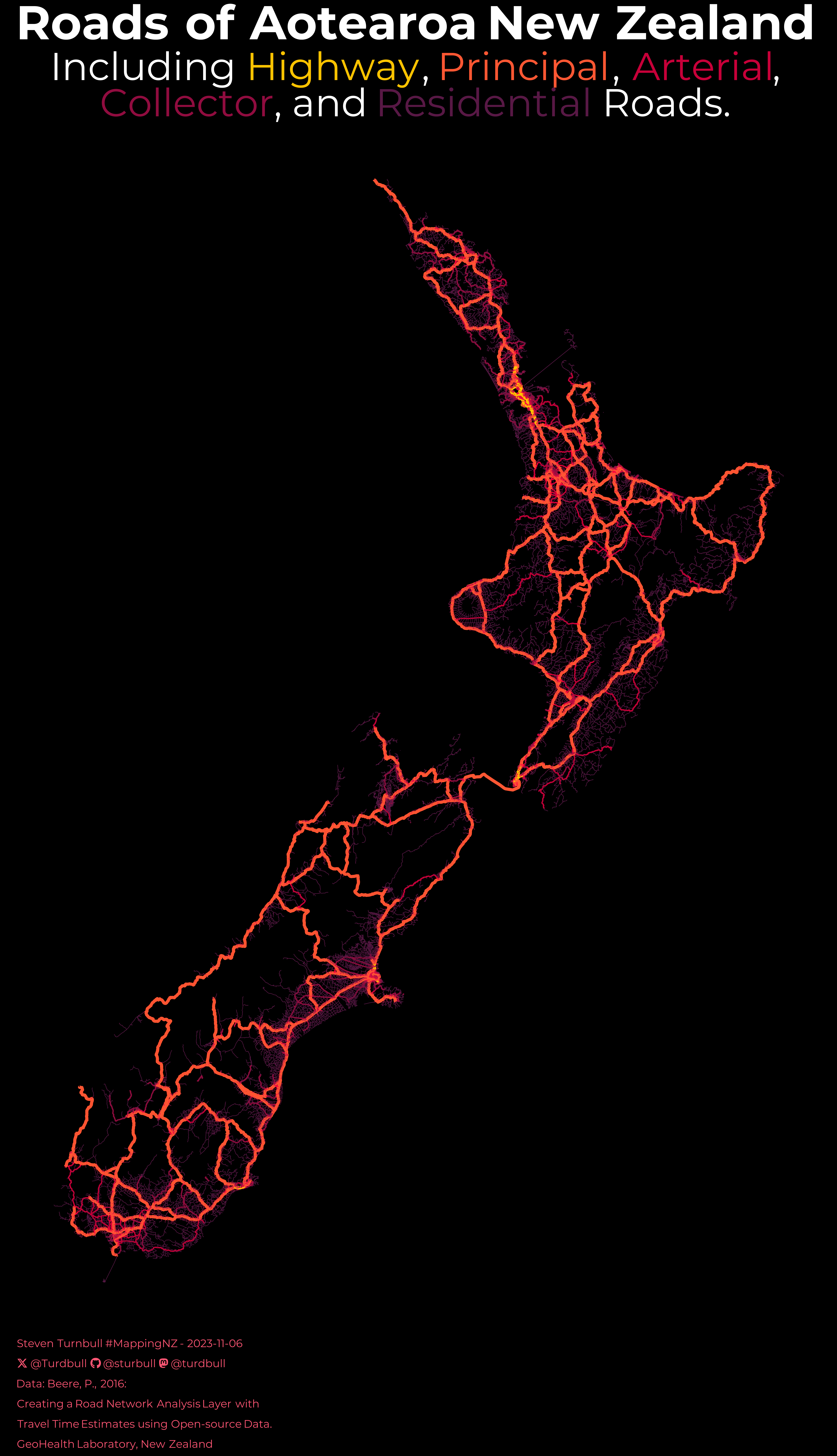{fig-align="center" height="50%" width="50%"}As a first step, we're going to load up the tennis club data.```{r}library(here)library(dplyr)library(reactable)df <-read.csv(here("inputs","tennis","tennis_coords.csv"))#We know the geocoding failed on some addresses, so we'll exclude thosedf_clean <- df |>filter(!is.na(latitude) |!is.na(longitude)) df_clean |>head() |>reactable()```# Processing our DataFirst things first, we need to set up our spatial data. We're going to need 3 different pieces of data:## 1: The shape file for Auckland Central.This is will be our map layer, showing where Auckland is.```{r auckland_map}library(sf)library(stringr)nz_sf <- read_sf(here("inputs", "shapefiles", "NZ_res01.shp")) # Get the coordinates for Auckland in WGS84auckland_coords <- matrix( c( 174.5, -37.0, # min x, min y (SW corner) 174.95, -37.0, # max x, min y (SE corner) 174.95, -36.7, # max x, max y (NE corner) 174.5, -36.7, # min x, max y (NW corner) 174.5, -37.0 # closing point (SW corner) ), ncol = 2, byrow = TRUE)# Create a POLYGON from the bounding box and set CRS to WGS84auckland_polygon <- st_polygon(list(auckland_coords)) |> st_sfc(crs = 4326) # Load the shapefile and transform to NZTM2000 (EPSG: 2193)auckland_sf <- nz_sf |> # Intersect the Auckland shapefile with the Auckland bounding box st_intersection(auckland_polygon) |> st_transform(crs = 2193) ```## 2: We'll need the road network data.We'll need to filter this data to only include roads within Auckland, and we'll also need to make sure the [Coordinate Reference System (CRS)](https://datacarpentry.org/organization-geospatial/03-crs.html) is the same as our Auckland data. The CRS tells R which map projection to use, and if the layers in our data use different projections, the map won't look correct. You can use the function `st_crs(data)` to get the CRS of an object, and the `st_transform` to set it as the same.As you can see, the road network data contains a range of variables identifying what type of road it is, and where it is located. We're going to filter out any roads that are not for cars.```{r roads_map}#Load our road datanz_roads <- st_read( here("inputs","shapefiles","NZ_roads.shp"), quiet = T ) #set NZ roads CRS to be the same as the auckland sf.#nz_roads<-st_transform(nz_roads, st_crs(auckland_polygon)) #roads_inside_auckland <- st_intersection(nz_roads, auckland_polygon)#get the roads tidyauckland_roads <- nz_roads |> filter(notforcar == 0) |> filter(region == "auckland") |> filter(!str_detect(label,"auckland waiheke island ferry")) |> st_transform(crs = 2193) head(auckland_roads) |> reactable()```## 3: We need to transform our tennis club location dataWe'll need to make sure it's in the same format and CRS.```{r points_map}#clean point df and put to sfpoint_sf <- df_clean |> st_as_sf( coords = c("longitude", "latitude"), crs = 4326 ) point_sf_auckland <- point_sf |> st_intersection(auckland_polygon) |> st_transform(crs = 2193) ```# Calculating IsodistancesBy getting the point data and the road map data into the same format, we've done much of the hard work. Our next step involves generating isodistance polygons from each of the tennis clubs based on the road network. We'll make use of the `calc_isochrones` function from the [`spNetwork`](https://rdrr.io/github/JeremyGelb/spNetwork/) package to accomplish this. The results of this function are passed onto the [`concaveman`](https://cran.r-project.org/web/packages/concaveman/index.html) package which provides polygons for our mapping use. The code below goes through each point in our tennis club data, and generates an isodistance around them of 5km.Note: This function can take a bit of time to run, depending on the processing power available. You can set multiple distance values, which is really handy, but for now we will stick to 5000m (5km).```{r isodistances, eval = F}library(spNetwork)library(concaveman)for(i in 1:nrow(point_sf_auckland)){ cat("\nGenerating isodistance for ",i,":", point_sf_auckland$storepoint_address[i]) iso_results <- calc_isochrones( lines = auckland_roads, start_points = point_sf_auckland[i,], dists = c(5000), weight = "Shape_Leng" ) # identifying each isocdistance iso_results$iso_oid <- paste( iso_results$point_id, iso_results$distance, sep = "_" ) # creating the polygons for each isodistance polygons <- lapply(unique(iso_results$iso_oid), function(oid){ # subseting the required lines lines <- subset(iso_results, iso_results$iso_oid == oid) # extracting the coordinates of the lines coords <- st_coordinates(lines) poly_coords <- concaveman(points = coords, concavity = 3) poly <- st_polygon(list(poly_coords[,1:2])) return(poly) }) # creating a SpatialPolygonsDataFrame iso_sp <- st_sf( iso_oid = unique(iso_results$iso_oid), distance = unique(iso_results$distance), geometry = polygons, crs = st_crs(iso_results) ) %>% mutate(storepoint_address = point_sf_auckland$storepoint_address[i]) iso_sp %>% write_sf(here("inputs","tennis",paste0("tennis_polygon_",i,".shp")))}```The above code chunk will save each tennis club isodistance as an individual shape file. We can load them individually, or grab them all and put them in a dataset as shown below.```{r load_isodistances}drive_isochrone_list<-list()FILES <- list.files(here("inputs","tennis"),full.names = T)SHP_FILES <- FILES[str_detect(FILES,".shp$")]for(i in 1:length(SHP_FILES)){ file_sf<-read_sf(SHP_FILES[i]) drive_isochrone_list[[i]] <- file_sf}drive_isochrone_sf <- sf::st_as_sf(data.table::rbindlist(drive_isochrone_list))```# VisualisationAnd here's what our distances look like. Maps like these can be very valuable for identifying gaps in access. Are there any places that tennis clubs isodistances do not cover?```{r plot, fig.height=10, fig.width=10}library(ggplot2)# Plottingggplot() + geom_sf( data = auckland_sf, alpha = 1, fill="black", colour="black", linewidth=0.2 ) + geom_sf( data = auckland_roads, alpha = 1, colour="grey80", linewidth=0.1 ) + geom_sf( data = drive_isochrone_sf, aes(fill = 'Driving Distance (5km)'), alpha = 0.25, colour="white" ) + geom_sf( data = point_sf_auckland |> filter(storepoint_address %in% unique(drive_isochrone_sf$strpnt_)), color = 'black', fill="#ccff00", shape=21, size=5, alpha=0.9 ) + theme_void() + theme( legend.title = element_blank(), legend.spacing = unit(0,"lines"), legend.position = "bottom", legend.text = element_text(size=20), title = element_text(size=20) ) + coord_sf(crs = 4326, xlim = c(174.6, 174.95), ylim = c(-37, -36.72) ) + ggtitle("5km Driving Isodistances of\nAuckland Tennis Clubs")```It's important to bear in mind the quality of the data is always important when drawing conclusions. For example, we know some tennis clubs are missing from our data, so some gaps in access may not really be gaps. This method also relies on having road network data available for use. [A lot of work](https://www.canterbury.ac.nz/content/dam/uoc-main-site/documents/pdfs/reports/geohealth-laboratory/Creating-a-Road-Network-Analysis-Layer-with-Travel-Time-Estimates-using-Opensource.pdf) can go into processing these data, while there are other open source options/libraries available as well, such [`openrouteservice`](https://openrouteservice.org/).The key advantages of this approach is that it avoids using API calls, instead using a local shape file of the NZ road network. This means that we could iterate through a whole range of distances, and process a whole load of data (even if it may take some time). Key things to watch out for, as always, is data quality. External services with an API may be more reliable.